Unlock Your Data's Potential: Migrating Excel to an Online Database
Spreadsheets are the junk drawers of the business world. They start out organized, holding a few lists and some simple math. Eventually, they become overflowing messes where nobody can find what they need. You might rely on Excel for daily tasks, but as your company grows, the tool stops working for you. Data corruption, version control issues, and restricted access are common headaches. Migrating Excel to an online database transforms these static files into dynamic, scalable, and secure assets that actually help your team make better decisions.
Moving your information to a cloud-based database changes how you interact with your work. It creates a space where data stays safe, updates happen in real time, and insights become clear. This transition moves your business away from the risks of manual file handling and toward a future where your information works for you.
Why Migrate Your Excel Data to an Online Database?
Excel was never designed to be a central database. It serves individual users well for quick calculations, but it fails when multiple people need to update the same records. Once your dataset crosses a certain size, Excel starts to lag. You need a system that supports growth rather than one that acts as a bottleneck.
The Perils of Spreadsheet Data Management
Relying on spreadsheets often creates a dangerous cycle of errors and missed opportunities. When your entire operation depends on a single file, you invite risks that are hard to fix once they happen.
Data Corruption and Loss Risks
Excel files are fragile. A software glitch, a computer crash, or a simple accidental click can corrupt an entire file. Because Excel lacks a native, robust backup system, you often lose hours or days of work instantly. Most users save versions manually, which means if the current file breaks, you might be looking at a backup from last week. That is data you cannot recover.
Version Control Nightmares
Have you ever seen a file named "Sales_Report_Final_v2_UPDATED.xlsx"? This naming convention is a symptom of a broken process. In teams, multiple people often email files back and forth. You end up with five different versions floating around. Nobody knows which one is the truth. This confusion leads to duplicate work and conflicting data.
Scalability and Performance Bottlenecks
Excel handles a few thousand rows well, but it chokes on large datasets. Complex formulas, pivot tables, and heavy formatting slow the program down to a crawl. You might experience crashes during simple tasks. As your business grows, the sheer volume of data will eventually make your spreadsheets unusable.
Security Vulnerabilities and Access Control
Excel offers very little protection for your data. You can password-protect a file, but that is often an all-or-nothing approach. You cannot easily restrict a user to only viewing specific columns or rows. If someone has the file, they can often see or change everything. This lack of granular control puts sensitive customer or financial information at risk.
The Transformative Power of Online Databases
Moving to a dedicated database solves these issues by changing the structure of your data. A database treats your information as distinct records, not just cells on a grid.
Enhanced Data Integrity and Reliability
Databases use strict rules called schemas. When you enter data, the system checks to see if it fits the format. If a column expects a date, it will not accept text. This prevents "dirty data" from entering your system in the first place. You gain consistency that spreadsheets simply cannot provide.
Centralized Data Access and Collaboration
An online database acts as a single source of truth. Your team connects to one central system. When one person updates a record, everyone else sees the change immediately. You no longer need to email files or wonder if your data is current.
Improved Scalability and Performance
Databases are built to store millions of records. They allow for complex searches that run in milliseconds, regardless of how much data you have. You can generate reports or analyze trends without the software freezing or crashing under the weight of the information.
Robust Security and Granular Access Control
Online databases offer high-level security features like encryption and audit trails. You control exactly who can access which part of the database. You can give a sales rep access to client contact info while hiding private payroll data. Every change gets logged, so you know exactly who modified a record and when.
Key Benefits of Migrating Your Data
The switch to a database system goes beyond just storage. It changes how your team operates on a daily basis.
Boosting Operational Efficiency
Manual data entry is a waste of time and a source of error. Databases allow you to connect your systems and automate the boring parts of your job.
Automation of Data Entry and Updates
You can link your database to other tools like your website, email system, or accounting software. Instead of copying and pasting data from an email into Excel, the database pulls the information automatically. This saves hours of manual work every week and stops typos from slipping in.
Simplified Reporting and Analytics
Creating reports in Excel often requires manual work with pivot tables. With a database, you can connect visualization tools directly to your data. These tools update your charts automatically. You spend your time looking at the insights instead of fighting with the spreadsheet layout.
Enhancing Data Security and Compliance
Business privacy rules change constantly. Using a database helps you keep up with these requirements without extra effort.
Meeting Regulatory Requirements
If you handle customer data, you likely need to follow laws like GDPR or HIPAA. These laws demand strict logs of who accesses sensitive data. Databases include built-in audit trails, which show you exactly who opened or changed a file. This makes proving compliance much easier during an audit.
Protecting Sensitive Business Information
Database security protects your intellectual property. Because you control permissions, you stop unauthorized users from exporting or deleting your data. These systems also offer regular, automated backups, ensuring your information stays safe even if a server fails.
Enabling Data-Driven Decision Making
Data is only useful if you can understand it. Databases turn raw numbers into clear information.
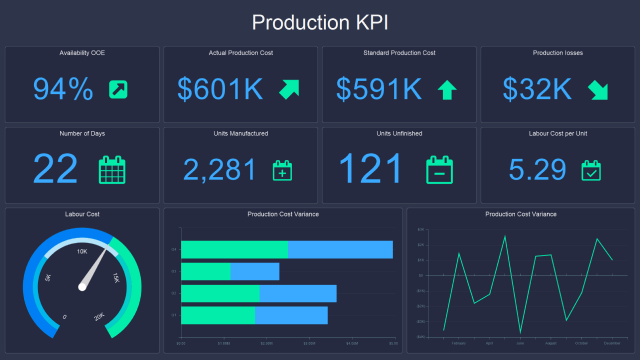
Real-time Data Insights and Dashboards
Because your database updates instantly, your dashboards show current information. You do not need to wait for a weekly report. If a trend changes on Tuesday, you see it on Tuesday. This speed allows your team to react quickly to market changes.
Predictive Analytics and Business Intelligence
Structured data is the foundation for advanced analysis. Once your information lives in a database, you can use machine learning tools to spot future trends. You can predict sales spikes or identify which products will underperform based on historical data.
Popular Solutions for Migrating Excel to an Online Database
When you decide to make the move, you have several paths to take. The right one depends on your budget, technical skills, and data needs.
Relational Databases (SQL)
This is the standard for most business data. SQL databases organize information into tables with rows and columns, similar to Excel, but with much more power.
PostgreSQL: A powerful, open-source choice that handles massive datasets well.
MySQL: Widely used and very reliable for web applications.
SQL Server: A standard choice for large enterprises that use other Microsoft tools.
NoSQL Databases
Sometimes, your data does not fit into neat tables. NoSQL databases handle unstructured or changing data formats better than traditional SQL systems.
MongoDB: Stores data in flexible documents rather than rigid tables.
Cassandra: Designed to handle huge amounts of data across many servers without downtime.
Cloud-Based Database Services
You do not need to manage your own servers anymore. Cloud providers offer managed services that handle the maintenance for you.
Amazon RDS: Offers managed versions of popular database engines.
Google Cloud SQL: A fully managed service that integrates well with other Google tools.
Azure SQL Database: A smart, scalable database service from Microsoft.
The Migration Process: A Step-by-Step Guide
Moving your data requires a plan. Do not rush the process or you risk losing important details.
Step 1: Planning and Assessment
Before you move a single row, you need to understand what you have.
Data Inventory: List every Excel file you use. Identify which ones contain active data and which ones are just archives.
Data Cleansing: Fix errors while the data is still in Excel. Remove duplicates, fix formatting, and fill in missing values. It is much harder to fix these issues after you import them.
Schema Design: Decide how your new database will look. Define your tables and the relationships between them. Think about what information you really need to keep.
Step 2: Data Extraction and Transformation
Now you prepare the files for the new system.
Exporting Data: Convert your Excel files into a standard format like CSV (Comma Separated Values). This format works with almost every database system.
Data Mapping: You need to tell the database which Excel column matches which database field. This is the stage where you transform your data structure to fit the new, more efficient format.
Step 3: Data Loading and Validation
The final phase is moving the data and checking it.
Importing Data: Use a tool or script to push your data into the database. Start with a small batch to ensure the import works correctly.
Verification: Run checks to make sure the row counts match your Excel files. Check for data errors or missing characters. Ensure the data looks right in the new system.
Best Practices and Actionable Tips for a Smooth Migration
Follow these tips to keep your project on track and avoid stress.
Start Small: Migrate a single, non-critical dataset first. This lets you practice the process and find any issues before you move your most important information.
Involve Stakeholders: Talk to the people who use the data every day. They might know about hidden quirks or requirements that you would otherwise miss.
Use a Phased Approach: Move data in chunks rather than trying to do everything on a weekend. This minimizes disruption to your daily operations.
Choose the Right Tools: Use data migration software to make the process easier. These tools often handle the mapping and validation work for you.
Plan for Maintenance: A database is not a "set it and forget it" tool. You need a plan for regular backups, updates, and user management after the migration is complete.
Conclusion: Embrace the Future of Your Data
Moving away from Excel is a big step, but it is necessary for modern growth. You solve the persistent problems of data corruption, version confusion, and security risks. You also gain new capabilities that allow you to automate work and find deeper insights.
By shifting to an online database, you build a foundation that supports your business as it scales. You stop spending time fixing spreadsheet errors and start spending time using your data to make smart, fast decisions. The transition takes planning, but the payoff is a safer, faster, and more efficient way to manage your company's most valuable asset.
Subscribe to our Articles: